First we’ll explain the different types of Raid Drive Series:
RAID stands for Redundant Array of Inexpensive (Independent) Disks.
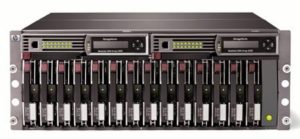 On most situations you will be using one of the following four levels of RAIDs.
- RAID 0 – 2 Plus Drives
- RAID 1 – 2 Plus Drives
- RAID 5 – 3 Plus Drives
- RAID 10 (also known as RAID 1+0) – 4 Plus Drives
Here we explains the main difference between these raid levels along with an easy to understand diagram.
In all the diagrams mentioned below:
- A, B, C, D, E and F – represents blocks
- p1, p2, and p3 – represents parity
RAID LEVEL 0

Following are the key points to remember for RAID level 0.
- Minimum 2 disks.
- Excellent performance ( as blocks are striped ).
- No redundancy ( no mirror, no parity ).
- Don’t use this for any critical system.
RAID LEVEL 1
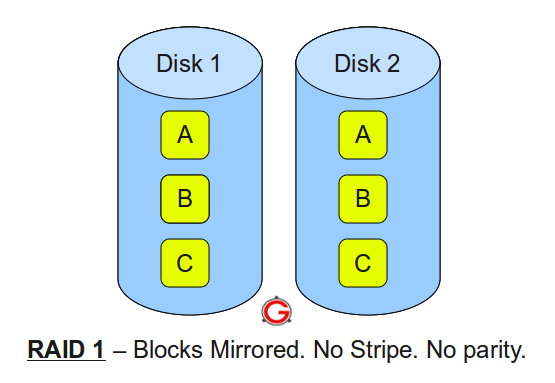
Following are the key points to remember for RAID level 1.
- Minimum 2 disks.
- Good performance ( no striping. no parity ).
- Excellent redundancy ( as blocks are mirrored ).
RAID LEVEL 5

Following are the key points to remember for RAID level 5.
- Minimum 3 disks.
- Good performance ( as blocks are striped ).
- Good redundancy ( distributed parity ).
- Best cost effective option providing both performance and redundancy. Use this for DB that is heavily read oriented. Write operations will be slow.
RAID LEVEL 10
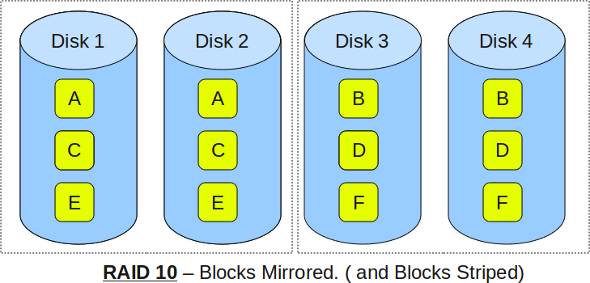
Following are the key points to remember for RAID level 10.
- Minimum 4 disks.
- This is also called as “stripe of mirrors”
- Excellent redundancy ( as blocks are mirrored )
- Excellent performance ( as blocks are striped )
- If you can afford the dollar, this is the BEST option for any mission critical applications (especially databases).